Security configuration management for software engineers

In my previous posts I've consistently pushed back on waste, whether it's time, money, or process overhead. Today I want to apply that same lens to security configuration management and argue that the engineering teams who build and run a product are the right people to own a big chunk of it. I'll use Content Security Policy (CSP) as the concrete example and show how Secutils.dev supports the full lifecycle: create, deploy, and monitor.
Two notes on the original post:
- The "monitor configuration" section ended with a
:::cautionsaying that automated CSP monitoring was not yet available. That has since shipped: CSP policies can be inherited from a raw policy string or fetched from any URL, and you can share a policy publicly for collaboration. Continuous monitoring (alerting on unexpected policy drift) is on the roadmap, with Page trackers and API trackers already usable as a workaround today. - The CSP UI now also categorises directives by purpose, flags risky values, and links to MDN explanations.
Why this matters
Today, security configuration management mostly sits with security experts and dedicated InfoSec teams. That's not a bad thing, but it's also not always efficient. The engineering teams who build, ship, and operate the product have the relevant context, the technical depth, and the day-to-day product knowledge. Excluding them from configuration work delays the feedback loop, raises cost, and can erode customer trust when things slip.
It's no coincidence that OWASP elevated "Security Misconfiguration" to the 5th spot in the OWASP Top Ten. Even a single non-trivial product has a sprawling security configuration surface, and keeping it correct over years of deploys is hard.
Take Content Security Policy as the canonical example. You write a policy you believe is restrictive enough, test it, ship it, and move on. Over time, browsers add new APIs, deprecate old ones, and attack techniques evolve. The MDN compatibility matrix alone is a maze:
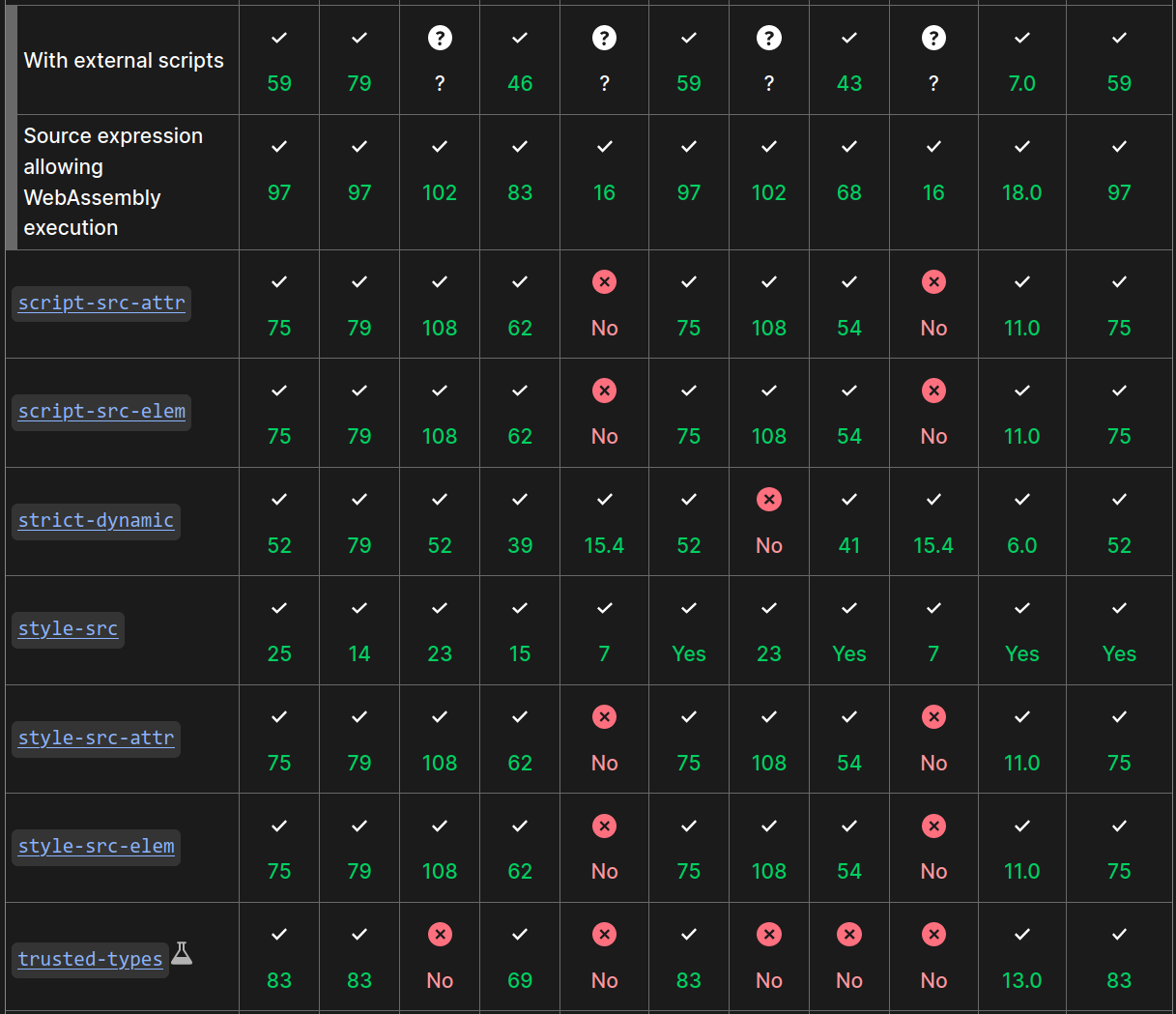
The policy you wrote a year ago might no longer be as restrictive as you thought. New directives might be available, others might be deprecated. So how do you know when to update it?
- Big orgs with mature security budgets have Red Teams and enterprise CSPM tooling running periodic scans, then triaging across teams. Effective, but slow and expensive.
- Small orgs outsource periodic security scans to vendors, get back hundreds of pages of mostly-false-positive findings, then dump triage on already-stretched developers.
- Indie projects and startups can't afford either, and often have to skip configuration management entirely.
In every case, the gap between "the configuration drifted" and "we noticed and fixed it" is far too long. The fix is to give engineers tools that are simple, accessible, and approachable, so that CSP, headers, permissions policies, and friends become as routine as performance tuning.
Create configuration
A good security configuration tool should guide engineers through creation, with enough inline context that the right tradeoffs are obvious without digging through specs.
Secutils.dev's CSP editor groups directives by purpose, explains each one, flags potentially risky values (e.g. 'unsafe-inline', broad wildcards), and links to MDN for the latest definitions. Reasonable defaults are pre-filled so a brand-new policy is a sensible starting point, not a blank canvas.
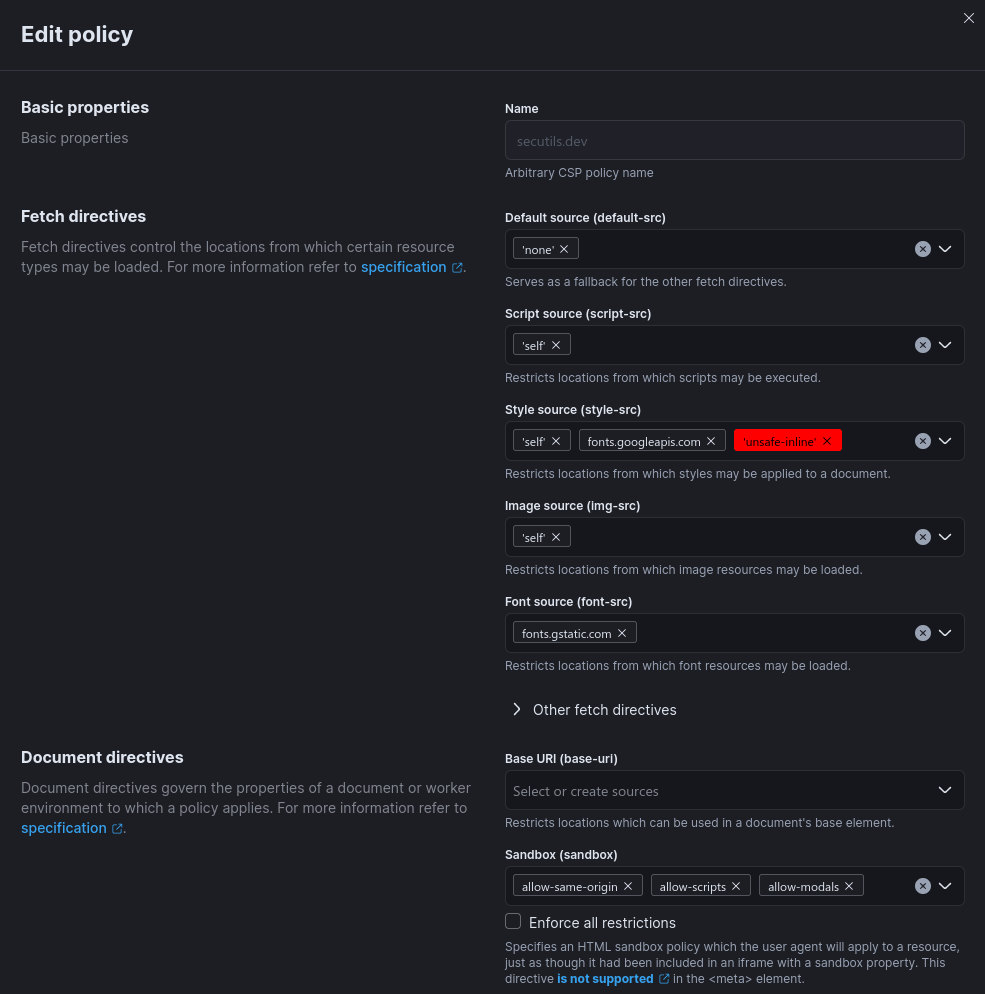
You can also import a policy you already have:
- Paste a raw
Content-Security-Policyheader value to parse and edit it. - Provide an HTTPS URL and Secutils.dev fetches the live
Content-Security-Policyheader from that page, then opens it in the editor.
Both flows are useful when you're auditing a third-party site or migrating an existing app onto a managed CSP workflow.
Deploy configuration
After creation, the system should help engineers ship the configuration correctly. Secutils.dev serialises the policy into a format ready for either the Content-Security-Policy HTTP header or the HTML <meta> tag, and explains how to wire up violation reports.
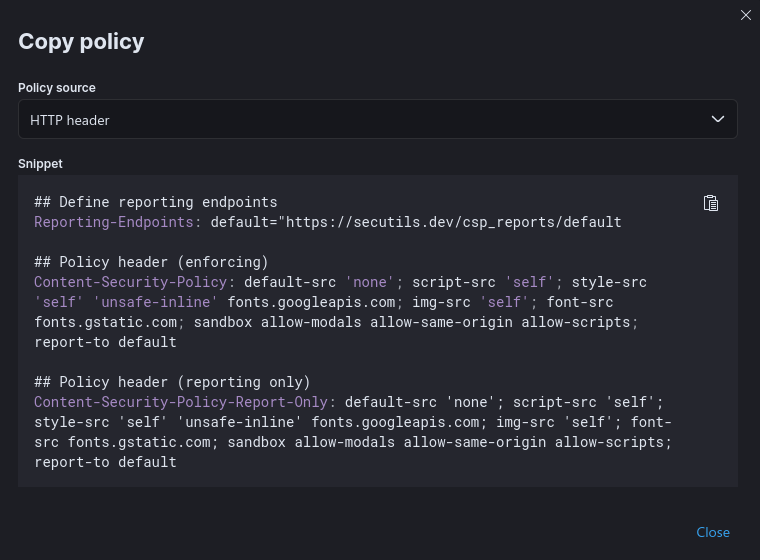
Violation reports can be collected with the Webhook responder feature: configure a responder at the URL referenced by report-uri (or report-to via Reporting API), point your CSP at it, and inspect every report directly in the workspace, without standing up your own ingestion endpoint.
Monitor configuration
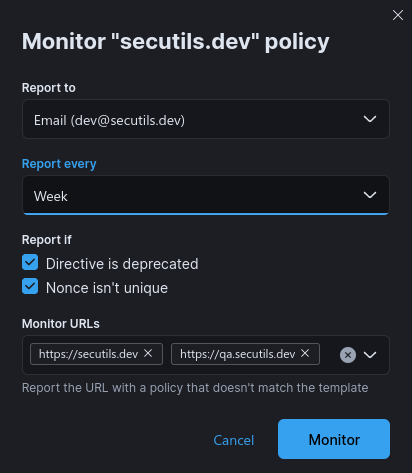
The third leg is making sure the configuration continues to work as intended over time, alerting engineers when nonces are misconfigured, when a directive is deprecated, or when a deployment unexpectedly weakens the policy.
You can already approximate this today with Page trackers or API trackers: point a tracker at the URL serving your Content-Security-Policy header, store the value, and you'll get an email diff every time it changes. Native CSP-aware monitoring (categorised alerts, "your nonce just stopped rotating" detection, and similar) is the next planned step.
Beyond CSP
CSP is just one of many configurations modern web apps need to keep correct. The same lifecycle (create, deploy, monitor) applies to:
- Same-origin and CORS policies
- Subresource Integrity (SRI)
- Permissions-Policy
- HSTS, COEP, COOP, CORP, Referrer-Policy, Trusted Types, and the rest of the modern web security alphabet soup.
These exist because the cybersecurity landscape doesn't sit still. The threat model evolves, your configurations should too. Democratising configuration management, by giving engineers tools that fit naturally into their daily workflow, is one of the highest-leverage things you can do for a product's long-term security posture.
Frequently asked questions
Should engineers replace the security team?
No. The point is collaboration, not replacement. Security teams set policy, define standards, and own incident response. Engineers own day-to-day implementation and operations of those policies. Tools like Secutils.dev shrink the gap between the two.
Can I import an existing CSP into Secutils.dev?
Yes. Either paste the raw policy string or provide a URL and Secutils.dev will fetch the live Content-Security-Policy header from that page. See the CSP guide.
How do I collect CSP violation reports?
Configure a Webhook responder, point your report-uri (or report-to via the Reporting API) at the responder URL, and the reports will appear in the responder's request log. No infrastructure to maintain on your side.
How do I detect when my deployed CSP changes unexpectedly?
Today: a Page tracker or an API tracker pointed at the URL serving the header, with email notifications enabled. Native CSP-aware monitoring is on the roadmap.
That wraps up today's post, thanks for taking the time to read it!
If you found this post helpful or interesting, please consider showing your support by starring secutils-dev/secutils GitHub repository. Also, feel free to follow me on Twitter, Mastodon, LinkedIn, Indie Hackers, or Dev Community.
Thank you for being a part of the community!