How to track anything on the internet or use Playwright for fun and profit

Hello!
After a refreshing winter blogging break, I'd like to resume introducing Secutils.dev features through practical use cases. Ever wished you could subscribe to changes on a web page that does not natively offer subscriptions? That is exactly what the Page tracker feature is for. It first shipped as the "web page content tracker" in v1.0.0-alpha.4 (December 2023) and has since grown into the unified Page tracker we have today. I'll walk through how I use it (mostly outside its primary security focus) and how it works under the hood.
Quite a bit has happened since the original post:
- The "Web Page Resources Tracker" and "Web Page Content Tracker" are now a single feature, the Page tracker. There is also a separate API tracker for tracking arbitrary HTTP API responses.
- Page trackers gained arbitrary cron schedules, debug runs with screenshots, the Camoufox stealth browser engine for sites that fingerprint Chromium, a Monaco-based diff viewer, Charts mode for numeric values, an execution log, and the ability to import Playwright codegen output as the extractor script (so you don't have to write the click/login flow by hand).
- The "user data tags" idea I floated below shipped as project-wide user tags, used to label and filter content across every utility.
- The custom Web Scraper code lives in Retrack (a git submodule at
components/retrack), and the API/scheduling side lives inretrack-api. - Authenticated pages are also fully supported now via custom HTTP headers and user secrets for credentials.
The example, the security model, and the architecture below all still apply, just with the names above.
If you've poked around Secutils.dev or read previous posts, you've probably seen the Page tracker. Its narrow security purpose is to detect tampered or broken web application deployments, but the underlying primitives (browser + scheduler + notifications) are useful for far more than that. The "JavaScript and CSS change detection" series goes deep on the resources side:
- Detecting changes in JavaScript and CSS isn't an easy task, Part 1
- Detecting changes in JavaScript and CSS isn't an easy task, Part 2
- Detecting changes in JavaScript and CSS isn't an easy task, Part 3
Back in 2023, while wiring up the resources tracker, I realised the same browser + scheduler + notifications combination unlocks a whole pile of "I just want to know when this thing changes" use cases. If you can manually open a page in a browser and read what changed, you can almost certainly automate it.
I built the original content tracker for a very specific need at my day job (monitoring security headers on production Cloud Kibana deployments), but in practice the trackers I run today look like this:
- In another project, AZbyte | ETF, I need fresh data from ETF providers (iShares, Vanguard, etc.). Page trackers monitor their websites for new fund listings, since none of them offer a useful subscription endpoint.
- For day-job work I track the metadata of my development serverless Elastic projects, so I get notified the moment they're auto-upgraded.
- Trackers watch the Pricing, Terms, and Privacy Policy pages of services I depend on (Notion, Oracle Cloud, Cloudflare). Quiet contract changes are a real risk, this catches them.
- Several "What's New" trackers fire only on diffs that match specific keywords.
At this point I have enough trackers that organising them was the next bottleneck. The user tags feature (secutils#43) eventually shipped for exactly this.
Let's look at one of my simpler personal trackers.
Example: trending GitHub repositories
I like discovering open-source projects via github.com/trending, but there is no native subscribe button. So:
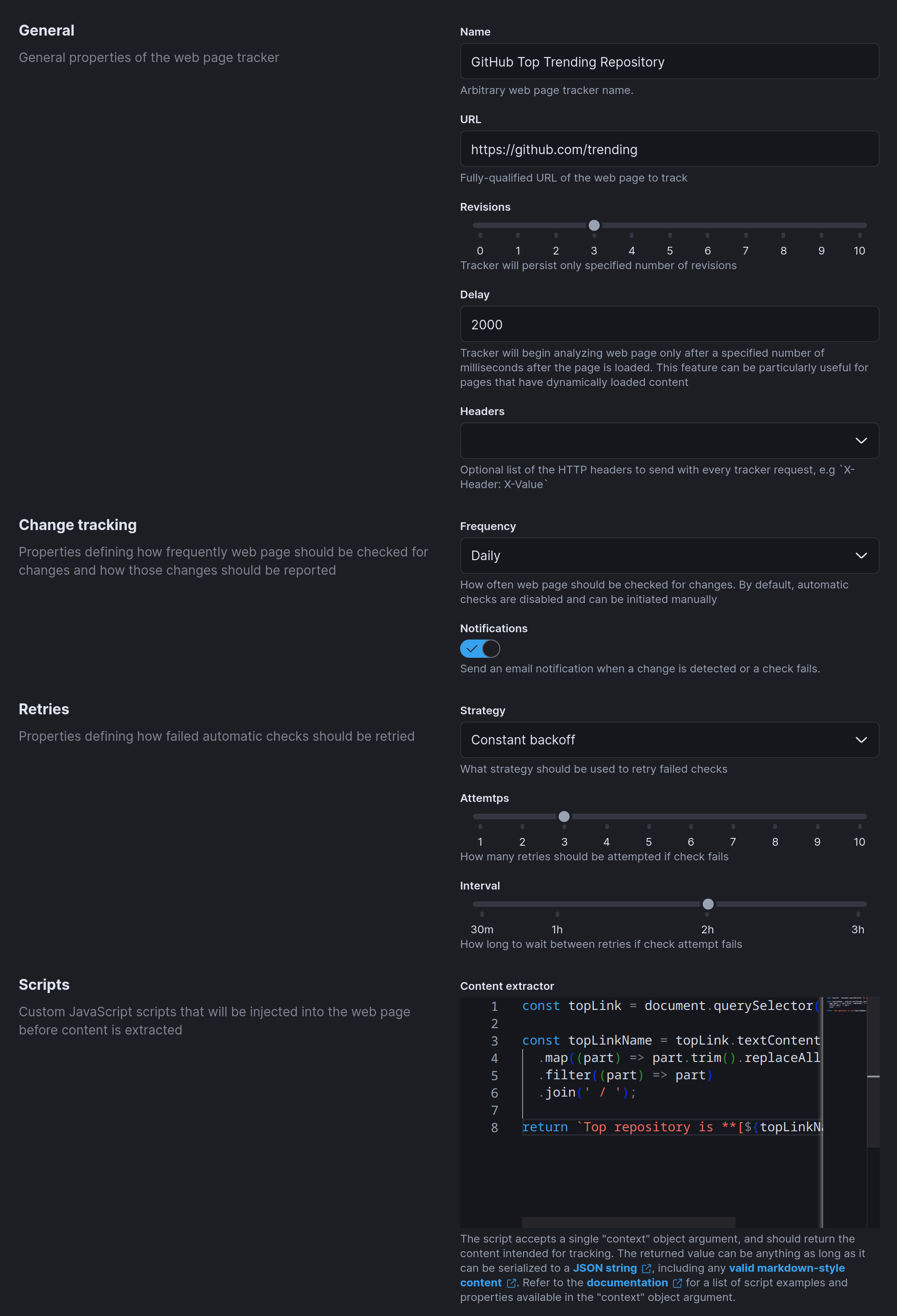
The tracker checks https://github.com/trending daily, retains the latest three revisions, and runs a small JavaScript "extractor" inside the page to compute the actual content of interest. If the new content differs from the previous revision, it emails me. If extraction fails, it retries a couple of times at 2-hour intervals before notifying me about the failure.
The interesting bit is the extractor:
// Get the top link on the trending page.
const topLink = document.querySelector('h2 a.Link');

// Clean up the repository name.
const topLinkName = topLink.textContent.split('/')
  .map((part) => part.trim().replaceAll('\n', ''))
  .filter((part) => part)
  .join(' / ');

// Return Markdown so the email body renders nicely.
return `Top repository is **[${topLinkName}](${topLink.href})**`;
The extractor uses CSS selectors specific to GitHub's HTML, so it's not bulletproof, but in practice these don't change often. When they do, the tracker tells me, and I update the script.
You don't need to be fluent in JavaScript to write something like this, an LLM will produce a reasonable first draft from a one-line description. Even better, Page trackers can now import Playwright codegen output directly: record the click flow in your browser, paste the resulting page.click() / page.locator() script into the tracker, and it just runs.
The extracted value is rendered in the workspace UI:

With Markdown plus a little creativity you can build a remarkably readable personal "what changed today" feed.
How it works
I'll skip the boring parts (UI, HTTP APIs, storage) and focus on the content extraction pipeline, which is where most of the interesting code lives.
All browser automation is owned by a separate service, Retrack, included in the Secutils.dev mono-repo as a git submodule at components/retrack. Retrack itself is two services:
- Retrack API (Rust): manages tracker definitions, schedules, and revision history.
- Retrack Web Scraper (Node.js + Playwright + Chromium/Camoufox): runs the actual fetches and extractor scripts.
The split is a security choice as much as anything else: a process that drives a real browser at user-supplied URLs has very different threat properties from a stateless API. The full security checklist is in "Running web scraping service securely".
At the heart of the scraper is Playwright with a thin HTTP layer on top. Initialisation looks like this (full source in the Retrack repository):
const browser = await chromium.launch({
  headless: true,
  chromiumSandbox: true,
  args: ['--disable-web-security'],
});
Headless Chromium with the sandbox on (highly recommended, see the security post). --disable-web-security lets injected scripts make cross-origin XHR/fetch calls, which is useful when an extractor needs to load a "real" extraction module from elsewhere (see the guide for an example). The browser is launched on demand and shut down after a configurable idle timeout to avoid pinning RAM.
The scraper accepts a small set of input parameters:
- [Required] URL of the page to track.
- [Required] The previously extracted content, so the extractor can compare and decide whether anything meaningful changed.
- [Required] The extractor JavaScript script that runs inside the page. The script can return any JSON-serialisable value.
- [Optional] Custom HTTP headers (for
Authorization,Cookie, consent banners, etc.). - [Optional] A wait selector or delay before extraction, for very dynamic single-page apps.
The simplified extraction loop:
// Fresh browsing context per fetch with custom HTTP headers.
const context = await browser.newContext({ extraHTTPHeaders: headers });
const page = await context.newPage();

// Inject the user-supplied extractor as `self.__secutils.extractContent(...)`.
if (scripts?.extractContent) {
  await page.addInitScript({
    content: `self.__secutils = { async extractContent(context) { ${scripts.extractContent} } };`,
  });
}

// Navigate.
let response: Response | null;
try {
  response = await page.goto(url, { timeout });
} catch (err) {
  return { type: 'client-error', error: '...' };
}

// Optional: wait for a specific selector before extracting.
if (waitSelector) {
  try {
    await page.waitForSelector(waitSelector, { timeout });
  } catch (err) {
    return { type: 'client-error', error: '...' };
  }
}

// Extract.
let extractedContent: string;
try {
  extractedContent = jsonStableStringify(
    scripts?.extractContent
      ? await extractContent(page, { previousContent })
      : jsBeautify.html_beautify(await page.content()),
  );
} catch (err) {
  return { type: 'client-error', error: '...' };
}

async function extractContent(page: Page, context: WebPageContext<string>) {
  return await page.evaluate(async ([context]) => {
    const extractContent = window.__secutils?.extractContent;
    if (typeof extractContent !== 'function') {
      throw new Error('...');
    }
    return await extractContent({
      ...context,
      previousContent:
        context.previousContent !== undefined
          ? JSON.parse(context.previousContent)
          : context.previousContent,
    });
  }, [context] as const);
}
Stable JSON stringification matters: an extractor that returns the same logical value should always serialise to the same string, otherwise the change-detection layer will flag spurious diffs.
A few details I've omitted (CDP-based external request capture, cache clearing, screenshot capture for debug runs, headless detection workarounds for stealth scraping with Camoufox) are visible in the Retrack source.
What's next
The Page tracker still has plenty of room to grow:
- Smarter "natural language" extractor authoring (the LLM generates the extractor from a one-line user description, with Playwright codegen capturing the click flow).
- Better CAPTCHA / WAF handling on top of the Camoufox engine (secutils#34).
- Visual-diff snapshots layered on top of the existing screenshot capability (secutils#33).
Frequently asked questions
Page tracker vs API tracker, when should I use which?
Use a Page tracker for anything that needs a real browser to render or interact (SPAs, login flows, stealth scraping). Use an API tracker for plain HTTP API responses where running a browser would be overkill (REST endpoints, raw Content-Security-Policy headers, JSON feeds).
Do I need to write JavaScript to use Page trackers?
Not necessarily. Page trackers can capture the full page HTML by default. For targeted extraction you can write a small extractor script, ask an LLM to write it for you, or import a Playwright codegen recording.
How do I track pages that require login?
Two options. For Basic / Bearer / cookie authentication, set the credentials as a custom HTTP header on the tracker. For credentials you don't want stored in plaintext, store them as a user secret and reference the secret by name. For multi-step OAuth, capture the login flow with Playwright codegen and use it as the tracker's extractor script.
Is the scraper open-source?
Yes. The scheduling and scraping engine is Retrack, open-source and reusable outside Secutils.dev.
Where do user tags fit in?
Tags are a workspace-wide labelling primitive. You can tag any tracker (and any other user data) and then filter by tag across the whole workspace. Excellent for organising "personal", "work", and per-project trackers.
That wraps up today's post, thanks for taking the time to read it!
If you found this post helpful or interesting, please consider showing your support by starring secutils-dev/secutils GitHub repository. Also, feel free to follow me on Twitter, Mastodon, LinkedIn, Indie Hackers, or Dev Community.